Tables
This page needs a recent browser (with SharedArrayBuffer support). Please update Chrome, Edge, Firefox or Safari to the latest version.
Tables
- A table uses the
tabularenvironment. You first describe the columns:
\begin{tabular}{l c r}
  left & centre & right \\
\end{tabular}
{l c r}means three columns: left-aligned, centred, right-aligned.
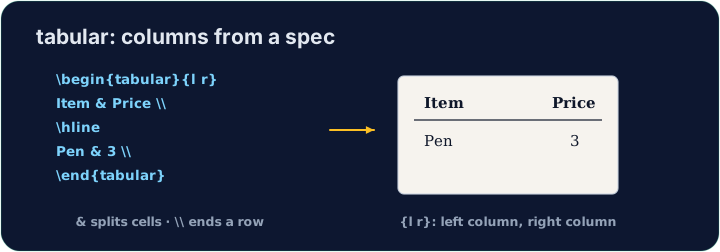
Rows and cells
- Inside,
&jumps to the next column and\\starts a new row:
\begin{tabular}{l l}
  Apple & 5 \\
  Banana & 3 \\
\end{tabular}
- The number of cells in each row must match the number of columns you declared.
Lines (optional)
- Add
|between column letters for vertical lines, and\hlinefor horizontal ones:
\begin{tabular}{|l|l|}
  \hline
  Apple & 5 \\ \hline
\end{tabular}
- For a cleaner look, professionals use the
booktabspackage instead of many lines.
Common mistakes
tabularneeds a column spec like{lcr}; separate cells with&and end rows with\\.- The number of
&per row must fit the column spec.
Build a small two-column table with \begin{tabular}{l l}. Separate the two cells in a row with &, and end each row with \\. Add the rows for Bob (30) and Mei (25).
Click Run to compile and preview the PDF.
Add lines to the table. Put \hline at the top, after the header row, and at the bottom, and use |l|l| in the column spec for vertical lines.
Click Run to compile and preview the PDF.