Programs and processes
This page needs a recent browser (with SharedArrayBuffer support). Please update Chrome, Edge, Firefox or Safari to the latest version.
What is a process?
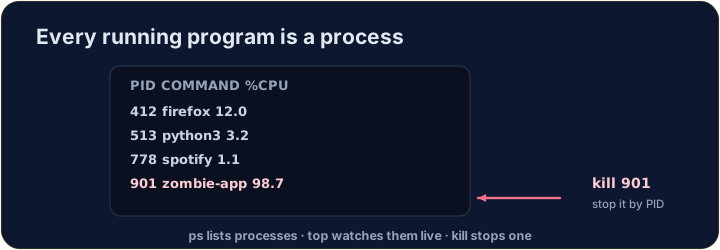
- A process is a running program. Your browser, your editor, and the shell itself are all processes.
- Each has a number — a PID (process ID) — that the system uses to keep track of it.
- (These commands talk to the real operating system, so they aren't part of our simulator — but here is what you'll use on a real machine.)
Seeing what is running
pslists your processes;ps auxlists all of them.top(or the nicerhtop) shows a live view that updates every second — handy to spot a program using too much CPU or memory:
top
- Press
qto quittop.
Stopping a process
- If a program is frozen, you can stop it. In the terminal, Ctrl-C stops the program running right now.
- For another process, find its PID with
psand thenkillit:
kill 1234
killpolitely asks the process to stop;kill -9forces it. Use force only as a last resort.
Now you try
ps,topandkilltalk to the real OS, so they are not in our simulator.- Instead, a snapshot of
psoutput is saved inprocesses.txt. Use the file tools you already know —grepandwc— to find the CPU-hog and count the processes.
Common mistakes
pslists running processes;killstops one by its PID.- A trailing
&runs a command in the background.
You cannot run ps in this simulator, but a teammate saved its output to processes.txt (each line is PID name cpu%). Find the frozen, CPU-hogging firefox line with grep firefox processes.txt.
How many processes were running when the snapshot was taken? Count the lines with cat processes.txt | wc -l.