Grouping with GROUP BY
Handout
This page needs a recent browser (with SharedArrayBuffer support). Please update Chrome, Edge, Firefox or Safari to the latest version.
Grouping rows with GROUP BY
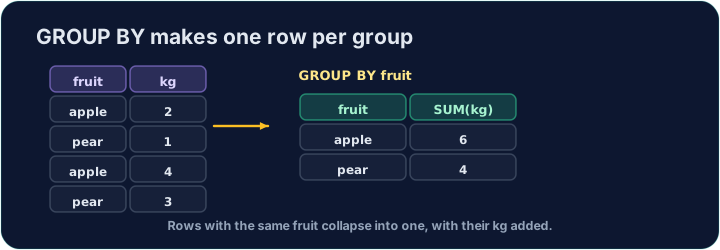
An aggregate like AVG normally summarises the whole table into one number. GROUP BY splits the rows into groups that share a value, and gives one summary row per group:
SELECT form, COUNT(*) AS n, ROUND(AVG(score), 2) AS avg_score
FROM student
GROUP BY form;
This gives one row for each form, with that form's count and average.
Filtering groups with HAVING
WHERE filters rows before grouping. To filter the groups themselves — using an aggregate — use HAVING:
SELECT form, COUNT(*) AS n
FROM student
GROUP BY form
HAVING COUNT(*) >= 3;
This keeps only forms with 3 or more students. (WHERE cannot test COUNT(*); HAVING can.)
Common mistakes
- Filter groups with
HAVING, rows withWHERE. - A plain column beside an aggregate must be in
GROUP BY.
For each form, show the form, the number of students as n, and the average score (2 d.p.) as avg_score. Group by form.
Click Run to see the output here.
Show each form and its student count n, but only for forms with 3 or more students. Use HAVING.
Click Run to see the output here.