Images
Handout
This page needs a recent browser (with SharedArrayBuffer support). Please update Chrome, Edge, Firefox or Safari to the latest version.
Images
- Show a picture with the
<img>tag. <img>is a single tag — no closing tag, like<br>.- It needs two attributes:
src(where the picture is) andalt(a description).
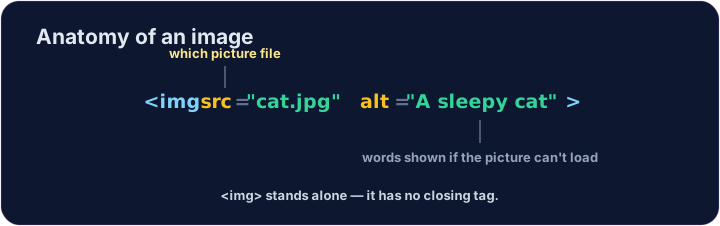
<img src="/static/code/web-basics/cat.svg" alt="A cartoon cat">
Why alt text matters
altis text that describes the picture.- It shows if the image cannot load, and screen readers read it aloud.
- Always add a short, clear
alt— it makes your page kinder to everyone.
Common mistakes
- An image needs
src(the file) andalt(a description). <img>has no separate closing tag.
Now you try
- The picture lives at
/static/code/web-basics/cat.svg. - Show it, then add
alttext to an image.
Show the cat picture. Add an <img> with src="/static/code/web-basics/cat.svg".
This image has no description. Add an alt attribute that describes it, like alt="A cartoon cat".