Showing and hiding (display)
Handout
This page needs a recent browser (with SharedArrayBuffer support). Please update Chrome, Edge, Firefox or Safari to the latest version.
How boxes flow
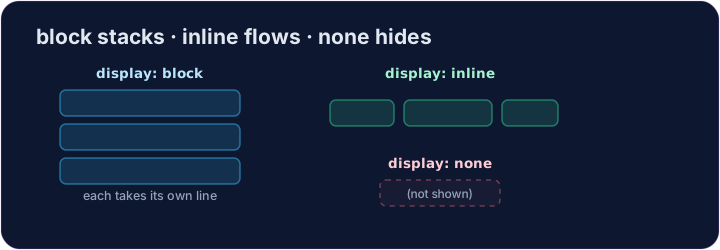
- Some elements are block: they stack on top of each other and fill the width —
<div>,<p>,<h1>. - Some are inline: they sit side by side, taking only as much room as they need —
<span>,<a>,<strong>. displaylets you change which way an element behaves.
display: none
display: none;removes an element from the page completely.- It's how menus, pop-ups, and "read more" sections stay hidden until needed.
- The element is still in your HTML — it just isn't shown.
<style>
  .pill { display: inline; background-color: #def; padding: 6px; }
  .gone { display: none; }
</style>
<span class="pill">Visible</span>
<span class="gone">You can't see me</span>
Common mistakes
display: noneremoves the element and its space;visibility: hiddenkeeps its space.blockstarts a new line;inlinedoes not.
Now you try
display: nonehides;display: blockmakes an element take its own line.- Hide one element, then change how another displays.
Hide the secret message. Add .secret { display: none; }.
Make each label sit on its own line. Add .label { display: block; }.