Inserting rows
Handout
This page needs a recent browser (with SharedArrayBuffer support). Please update Chrome, Edge, Firefox or Safari to the latest version.
Adding rows with INSERT
INSERT adds a new row to a table. List the columns, then a matching set of VALUES:
INSERT INTO product (code, title, price, in_stock)
VALUES ('P04', 'Ruler', 1.20, 75);
Text goes in single quotes; numbers do not. The values must line up with the columns, in the same order.
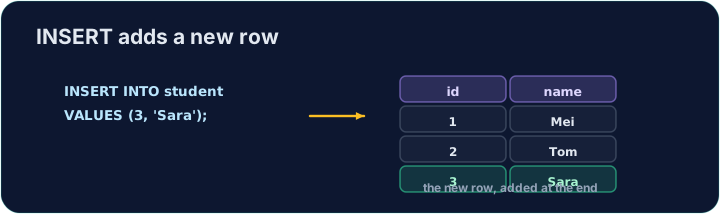
Seeing the effect
INSERT changes the data but returns no rows itself, so Run just reports how many rows changed. To see the new row, run a SELECT afterwards.
The checker does this for you: it runs your INSERT, then reads the table back to confirm your row is there.
Common mistakes
- The values must line up with the columns in order and type.
- Quote text values with single quotes.
Add a new product to the product table: code 'P04', title 'Ruler', price 1.20, in_stock 75.
Click Run to see the output here.
Add a new customer to the customer table: id 5, name 'Eve', city 'York'. List the columns you are filling, then give the matching VALUES.
Click Run to see the output here.